
Mobile app coming soon
Azerbaijan's first local EV charging platform
Find a station on the map, start charging with a QR code and follow kWh and cost live. The app, the payment system and station management are built in Azerbaijan by our own team.
- Coming soonGoogle Play
- Coming soonApp Store
Android first, iOS later.
Why a local platform
EVstop's software is written in Azerbaijan by our own team. For drivers that means three things.
Support is here
Report a problem right from the app, with a photo if you like. Our team in Azerbaijan handles it.
Prices are set here
We set the tariffs ourselves. Charging is billed per kWh, the tariff is shown in the app before you start, and you pay in manat.
Development is here
We write the app, the payment system and station management ourselves, so your feedback can turn straight into an improvement.
How it works
From the station to the receipt, everything is in one app.
Step 1
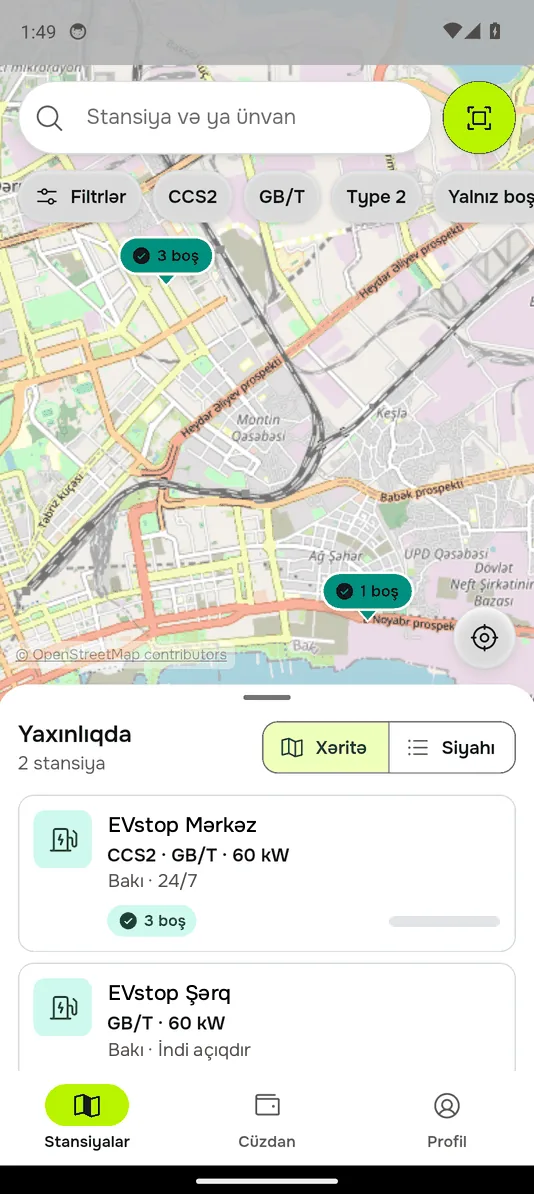
Find a station
Browse the map or the list and filter by connector type. No sign-up needed for that.
Step 2
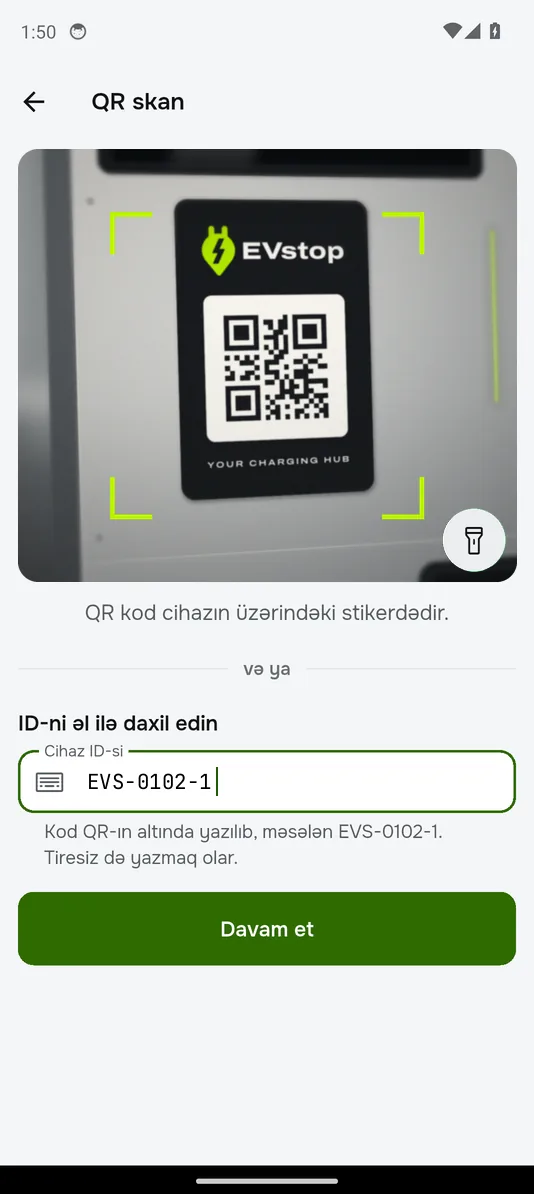
Scan the QR code
Scan the QR code on the charger or type its code.
Step 3
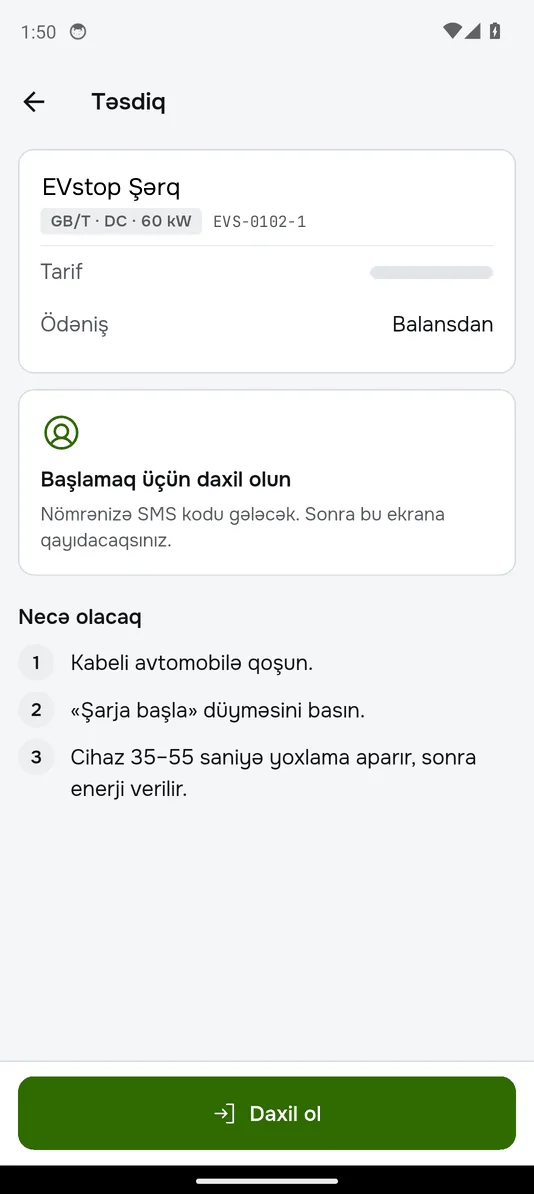
Confirm
You see the tariff and your balance and can set an amount limit. Sign-in is with your phone number and an SMS code.
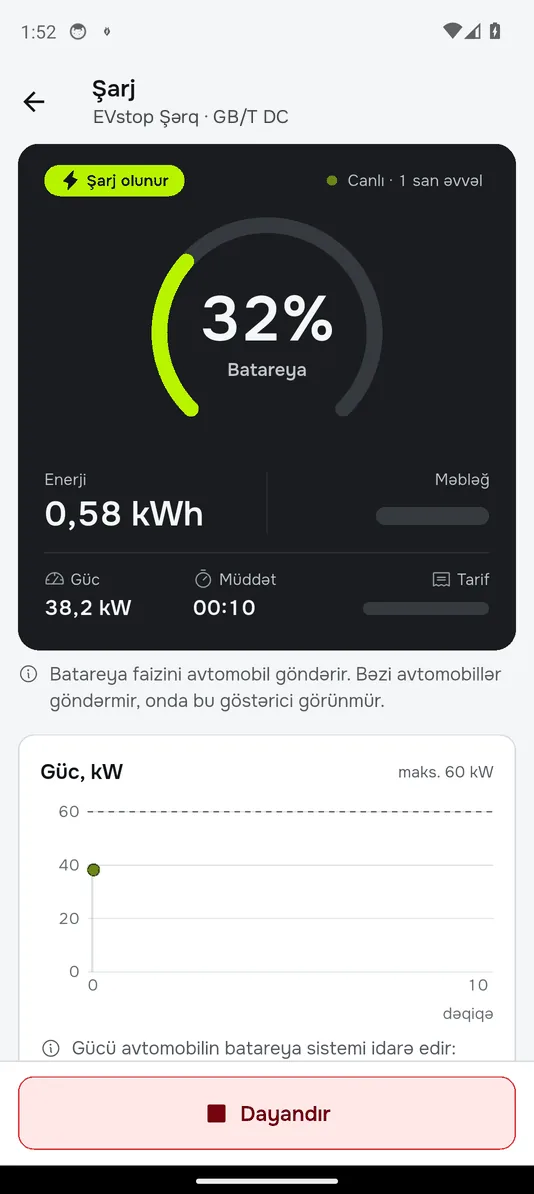
Step 4
Follow it live
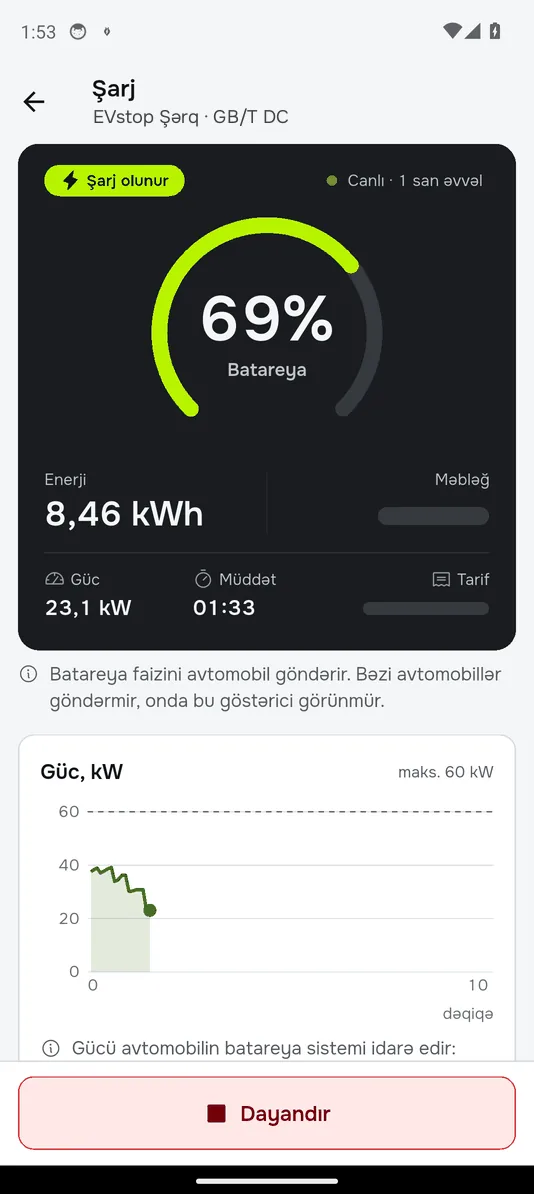
Energy, cost, power and time update live. If the car reports its battery level, you see that too.
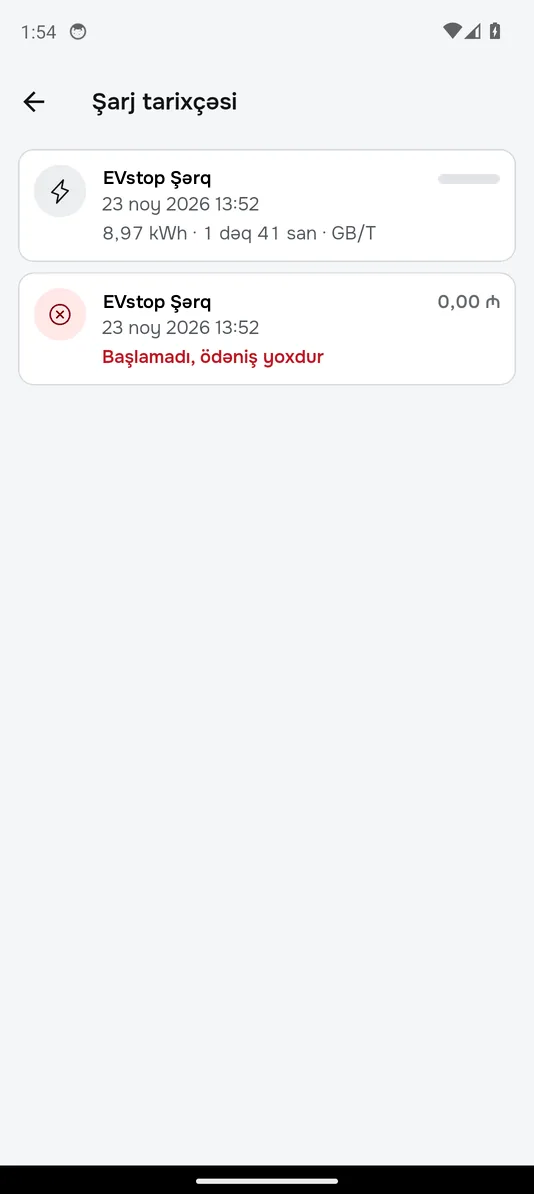
Step 5
Get the receipt
Stop whenever you like. Receipts and history stay in the app, and you can share a receipt as a PDF.
Screens are from the app's test environment; station names and the code are examples. Prices and amounts are hidden: the tariff is shown in the app.
What the app does
Everything you need to charge, in one place.
Map and list
Stations, free connectors, filters by connector type.
Start by QR or code
Scan the QR code on the charger or type the code.
Live charging
kWh, cost, power and time; battery level when the car reports it.
Automatic stop
Charging stops by itself when your balance or the amount limit you chose runs out. You can also stop it at any time.
Receipts and history
A receipt for every charge, with the meter readings. Open it or share it as a PDF.
Wallet
Top up your balance with a bank card and save the card. Refund what is left to your card.
Notifications
When charging starts and ends, about your balance and receipts.
Report a problem
Category, comment and up to 3 photos. It goes straight to our team.
Three languages
Azerbaijani, Russian and English; light and dark theme.
Network: coming soon
Planned stations: Baku, Ganja, the regions and the main highways. None is open yet; every one is marked “Coming soon”.
- 39planned points
- 18cities
- 3highways
Points are approximate (city or district level), not exact addresses. Each station will appear in the app when it opens.
Cities
- Baku15 points
- Ganja4 points
- Sumgait2 points
- Shaki1 point
- Guba1 point
- Lankaran1 point
- Mingachevir1 point
- Shamakhi1 point
- Gabala1 point
- Shirvan1 point
- Barda1 point
- Yevlakh1 point
- Shamkir1 point
- Tovuz1 point
- Gazakh1 point
- Zagatala1 point
- Khachmaz1 point
- Salyan1 point
- Highways3 points
Full list of points
Baku
- EVstop — Baku, SabailComing soon
- EVstop — Baku, BayilComing soon
- EVstop — Baku, NasimiComing soon
- EVstop — Baku, YasamalComing soon
- EVstop — Baku, NarimanovComing soon
- EVstop — Baku, KhataiComing soon
- EVstop — Baku, AhmadliComing soon
- EVstop — Baku, NizamiComing soon
- EVstop — Baku, BinagadiComing soon
- EVstop — Baku, BilajariComing soon
- EVstop — Baku, BakikhanovComing soon
- EVstop — Baku, SurakhaniComing soon
- EVstop — Baku, MardakanComing soon
- EVstop — Baku, BuzovnaComing soon
- EVstop — Baku, LokbatanComing soon
Ganja
- EVstop — Ganja, CentreComing soon
- EVstop — Ganja, KapazComing soon
- EVstop — Ganja, NizamiComing soon
- EVstop — Ganja, EastComing soon
Sumgait
- EVstop — Sumgait, CentreComing soon
- EVstop — Sumgait, SouthComing soon
Shaki
- EVstop — Shaki, CentreComing soon
Guba
- EVstop — Guba, CentreComing soon
Lankaran
- EVstop — Lankaran, CentreComing soon
Mingachevir
- EVstop — Mingachevir, CentreComing soon
Shamakhi
- EVstop — Shamakhi, CentreComing soon
Gabala
- EVstop — Gabala, CentreComing soon
Shirvan
- EVstop — Shirvan, CentreComing soon
Barda
- EVstop — Barda, CentreComing soon
Yevlakh
- EVstop — Yevlakh, CentreComing soon
Shamkir
- EVstop — Shamkir, CentreComing soon
Tovuz
- EVstop — Tovuz, CentreComing soon
Gazakh
- EVstop — Gazakh, CentreComing soon
Zagatala
- EVstop — Zagatala, CentreComing soon
Khachmaz
- EVstop — Khachmaz, CentreComing soon
Salyan
- EVstop — Salyan, CentreComing soon
Highways
- EVstop — Baku–Shamakhi highwayComing soon
- EVstop — Baku–Guba highwayComing soon
- EVstop — Baku–Alat highwayComing soon
Frequently asked questions
When is the app coming out?
First for Android on Google Play, then for iOS on the App Store. We will announce the date separately.
How is the price calculated?
By the energy delivered: kWh × tariff. Energy is the difference between the charger meter's start and end readings, and the receipt shows both. Each station's tariff is shown in the app before you start.
How do I pay?
From your balance in the app. You top it up with a bank card: you pay on the bank's page, and card details never reach EVstop.
What happens when the balance runs out?
Charging stops by itself. If you chose an amount limit, it stops at that amount.
Am I charged if the charge did not start?
No. A charge that did not start shows in the history as “Did not start, no payment”.
Can I get my balance back to my card?
Yes. The money goes back to the cards you topped up with. If you delete your account, the remaining balance also goes back to your cards.
Do I need to sign up?
You can browse the map and stations without signing in. To charge, you sign in with your phone number and an SMS code.
Why don't I see the battery level?
The car reports it. Some cars do not, and then it is not shown.
When will the stations open?
The points on the map are planned locations, all marked “Coming soon”. Each station will appear in the app when it opens.
Contact
Write to us with questions, ideas or partnership requests.
Phone
+994 55 966 33 44Email
[email protected]